Here is how you can
Increase speed of Reliance Netconnect Broadband + datacard -
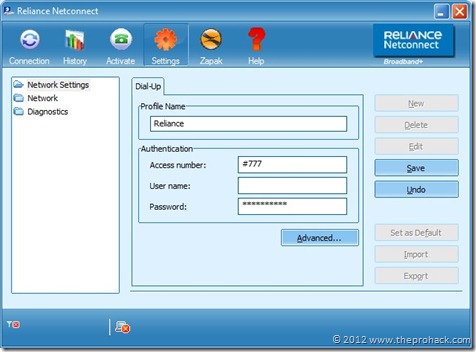
Plugin your data card, launch application, go to settings, click on edit.
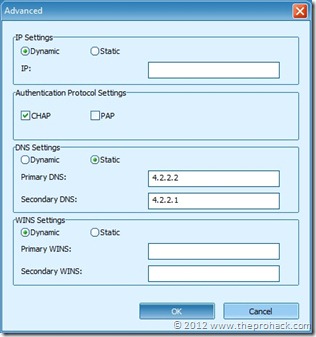
Click on advanced and put DNS server IPs. I found Verizon 4.2.2.2 //4.2.2.1 and Open DNS 208.67.222.222 // 208.67.220.220 work best for me. You can also try Google DNS 8.8.8.8 // 8.8.4.4 . Experiment and pick your choice.
Once done, click OK, save it and connect. you will get improved speeds..The whole process makes me wonder why Reliance’s default DNS is so slow . Do they even use their datacards at their home ? :|
On to my story, Since, even after changing DNS, the speeds were not good enough for me, so I thought, why not to recharge my MTS Data card online and then use it. Instantly I opened MTS website and after entering required details, transferring money to MTS from my online account, the page hanged and session was timed out. Responding to my sense of deja vu, I checked the data card and found it was not sending/receiving any data. the fucker dropped the connection just I when i was about to get my transaction completed.
I guess it took its revenge :X
I immediately emailed to MTS customer care/RechargeItNow/Bank customer care and I have *yet* to receive a helpful followup message on email. I contacted MTS customer care on phone and entered 1,1,1,1,<datacard MDN number>,1 waited for 2 minutes 46 seconds (
yeah..i timed it) , the automated IVR said “
after several tries you have not entered any number, so we are transferring your call to our expert” . Well..it wasn't my fault, again, there is some fault in their system as I tried 3 different valid MDN numbers later on and I got the same result. Nevertheless, I was put on call with an *expert* to whom I explained my issue and asked for escalation matrix, the details of email ID and in simple words, “
what to do in case of transaction failure, the MTS way ? ”
The result was flabbergasting, the CCE spoke in an english which by all means was incomprehensible to me, I politely disconnected the call and then fumed for 2-3 minutes while looking at the Reliance datacard.
 Skype Hacker v.2.0 is a password hacking tool that is used to recover / hack lost or forgotten passwords for any skype accounts. The program is very simple to use, just launch it, make a few mouse clicks and you will get all information about your desire Skype accounts including passwords. You are not required to be a password recovery professional and make it through a lengthy configuration process. Skype Hacker works in a fully automatic mode. Even better, you don’t have to wait for hours for the password hack process to complete. Skype Hacker v.2.0 software is now available for download